
Minecraft hosting done right
Java & Bedrock Minecraft servers high performance, hosted in France: Forge, Fabric, Paper, Spigot, Bukkit. Ryzen 9 CPU, NVMe SSD, free anti-DDoS, 150+ one-click modpacks, responsive support. From €1.99/month.
Our Minecraft plans
Pick the power that fits your project
PLAN
Select your plan
HARDWARE
- Processor : 2x Intel Xeon Gold
- Clock speed : 4 GHz
- RAM : 500 GB DDR4
- Storage : NVMe SSD
- Network : 10 Gbps
- Anti-DDoS : included
- AI dev assistant : included (fair use)
Versions Minecraft supported
9 server types available
Modpacks ready to install
10,000+ modpacks available
Panel control
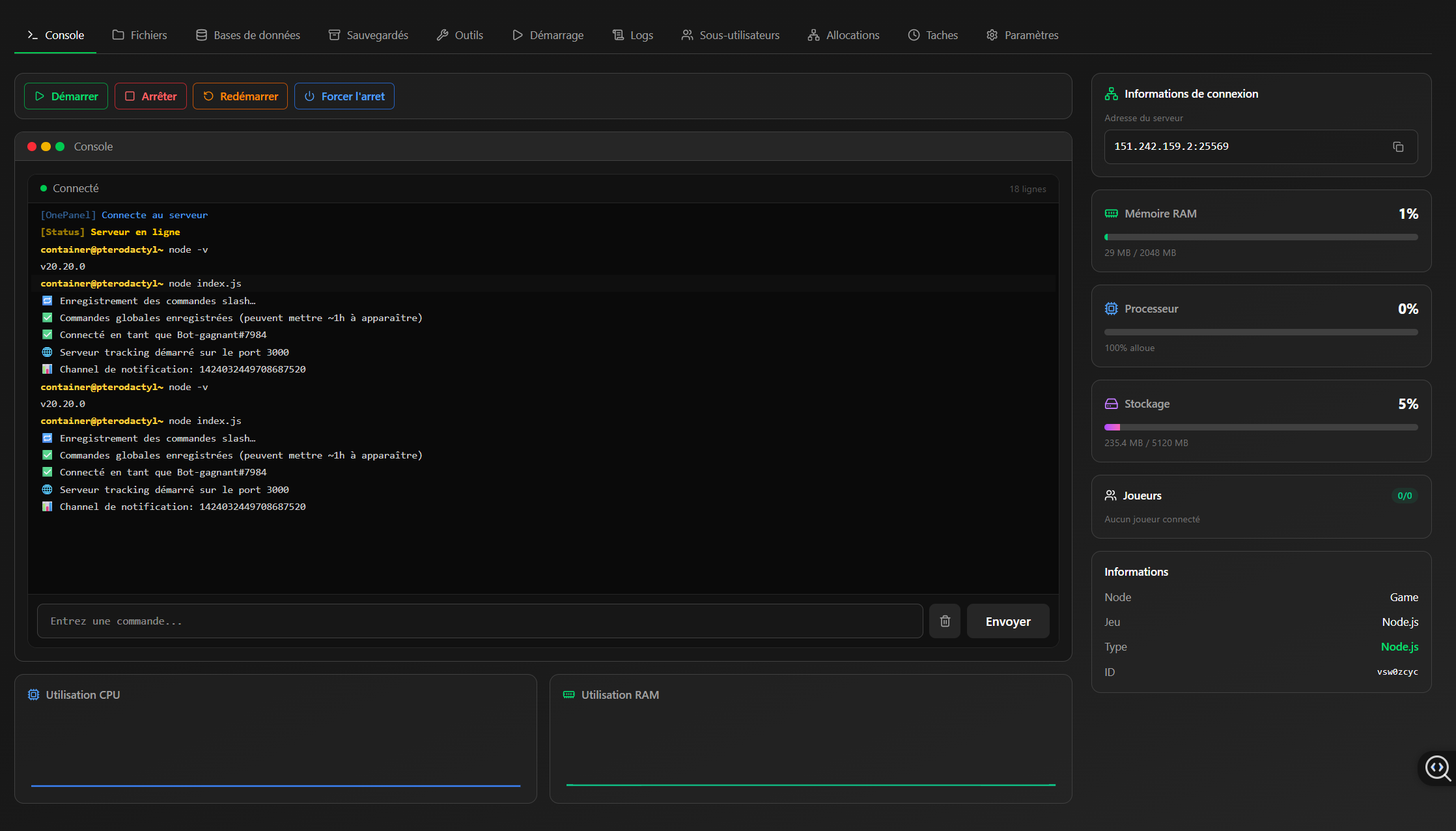
Console
Keep control of your server in real time. Read colour-coded logs, see who is connected, watch memory usage and join your own game in one click.
Why rent a Minecraft server with OneHeberge?
What professional Minecraft hosting brings to your community.
OneHeberge, your Minecraft host since 2025
Since 2025 OneHeberge has supported thousands of players and Minecraft communities across France and Europe. That experience goes into servers that are tuned, stable and fast, built to give your players the best possible session.
You are dealing with a host that actually plays the game. Responsive support, modern infrastructure built on Ryzen 9 processors and NVMe SSDs, and game-grade DDoS protection keeping your server reachable around the clock.
Get your Minecraft server running in 5 minutes
No server expertise needed — everything happens in your browser. Here are the steps to your first session.
-
Choose your plan
Depending on your project: Standard (4 GB) for 5-15 Vanilla players. For modpacks (Forge, NeoForge, Fabric), we strongly recommend our AMD Ryzen 9 plans : better single-thread speed, and a clear edge on the heavy work mods create (chunk generation, entities, redstone). RLCraft, ATM10, Pixelmon and Better Minecraft run far better on AMD than on Intel. Plan for Premium AMD (8 GB) for mid-sized modpacks, Ultimate AMD (16 GB and up) for large modpacks or 50+ player servers. You can upgrade at any time without losing your data.
-
Place your order
Secure payment by card, PayPal or bank transfer. Automatic activation in under 2 minutes. No commitment, billed monthly.
-
Pick your version and loader
From the panel, pick your Minecraft version (1.7 to 1.21+) and your loader: Vanilla, Paper, Purpur, Fabric, Forge, NeoForge, or one of 200+ ready-made modpacks. The panel downloads and configures everything for you.
-
Customise and launch
Edit your
server.properties, upload your plugins and mods over SFTP or through the web file manager, create your worlds. Click Start and your server is online in under 30 seconds. -
Invite your players
Share the IP and port with your friends, or point a custom domain at it with an SRV record. Watch the live console, manage permissions and trigger a manual backup from the panel whenever you want.
🤖 Stuck? On our Discord, an AI support assistant answers instantly and helps diagnose most setup problems — incompatible mods, crashing plugins, ports, configuration. For anything trickier, our human team takes over.
Sizing your Minecraft server
The question that comes up most before renting a Minecraft server is "how much RAM do I need?". The answer depends far less on player count than on what you intend to run. Here is how to choose without overpaying.
How much RAM does your Minecraft server need?
| Your project | Players | Recommended RAM |
|---|---|---|
| Vanilla or Paper among friends | 2 à 10 | 2 GB |
| Public survival, a few plugins | 10 à 30 | 4 GB |
| Light modpack (50 to 80 mods) | 5 à 10 | 6 GB |
| Large modpack such as ATM or Cobblemon | 10 à 20 | 8 to 12 GB |
| Multi-server network (Velocity, BungeeCord) | 50+ | 16 GB and up |
Something few hosts will tell you: adding RAM does not make a server faster. Minecraft runs on the Java virtual machine, whose garbage collector has to walk the memory you allocate. Past a dozen gigabytes on the default collector, pauses get longer and show up in game as micro-freezes. On our high-memory plans we switch to ZGC, designed to keep pauses very short even with 30 GB allocated. If your server lags at 8 GB, the cause is almost always a mod or a plugin, not memory.
Java, Bedrock, or both?
Java Edition is the original PC edition: it is the one that accepts Forge and Fabric mods, and the vast majority of public servers run on it. Bedrock is the console, mobile and Windows Store edition. The two do not talk to each other natively.
To welcome friends on phone or console onto a Java server, the answer is Geyser, paired with Floodgate , which spares your Bedrock players from needing a Java account. Both install as ordinary plugins. Budget roughly 500 MB of extra memory for the protocol translation.
Vanilla, Paper, Fabric or Forge: which one?
Vanilla is Mojang's official server: faithful to the game, but barely optimised. Paper is identical from a player's point of view while fixing a great deal of internal slowness: the best default for survival or a plugin server, and it comfortably handles twice the players on the same resources. Fabric is a light, fast mod loader, ideal for recent versions and modern modpacks. Forge and NeoForge remain unavoidable for large industrial modpacks, but they need noticeably more memory and start more slowly.
Three settings that change everything
Before buying more resources, tune these values in
server.properties. The view distance
(view-distance) is by far the most expensive setting: going from 10 to 6 nearly halves server load, and your players will barely notice. The simulation distance (simulation-distance) controls the chunks where mobs and mechanisms stay active — 4 is plenty. Finally,
pre-generating your world with a plugin such as Chunky removes the stutter caused by terrain generation while players explore.
Migrating from another host
Changing host does not mean starting over. Your world, plugins and configuration transfer as they are: download your entire server folder over FTP, then drop it onto the new one through our file manager or over SFTP. Keep the world folder, the server.properties file, your plugins or mods and their configuration. If you use a database, export it before switching. Our support will handle the migration free of charge if you would rather not touch it.
What our customers say
"I have several services with them and, months in, I fully stand by it."
"Just perfect."
"Good hosting for any kind of server, at a small price."
"Cool, recommended."
"Top quality host, I highly recommend it, and support that is responsive and lives up to expectations."
"Good after-sales service. The website is a bit annoying at times, you have to refresh the page because it throws a 429 error quite easily. These last weeks I no longer had access to the control panel, but since we have stopped playing I did not take the time to contact support, who would certainly have sorted it out. Recommended all the same!"
"A good host, quick on the draw when it comes to moderation, and not too expensive either."
"Perfect, replies fast and finds the problem quickly. Helped us improve our server!"
"I have several services with them and, months in, I fully stand by it."
"Just perfect."
"Good hosting for any kind of server, at a small price."
"Cool, recommended."
"Top quality host, I highly recommend it, and support that is responsive and lives up to expectations."
"Good after-sales service. The website is a bit annoying at times, you have to refresh the page because it throws a 429 error quite easily. These last weeks I no longer had access to the control panel, but since we have stopped playing I did not take the time to contact support, who would certainly have sorted it out. Recommended all the same!"
"A good host, quick on the draw when it comes to moderation, and not too expensive either."
"Perfect, replies fast and finds the problem quickly. Helped us improve our server!"
"Nice and quick, and effective."
"Simple, effective and dependable."
"Very good experience with OneHeberge: extremely responsive support, a very flexible plan and a server that just works. Recommended!"
"I have several services with OneHeberge and I am delighted with them. Thank you for the support."
"I have a Windows VPS and I am delighted with it. Luc is always there to help when needed."
"Incredible price, and quality I have not seen anywhere else!"
"Very good service."
"Nice and quick, and effective."
"Simple, effective and dependable."
"Very good experience with OneHeberge: extremely responsive support, a very flexible plan and a server that just works. Recommended!"
"I have several services with OneHeberge and I am delighted with them. Thank you for the support."
"I have a Windows VPS and I am delighted with it. Luc is always there to help when needed."
"Incredible price, and quality I have not seen anywhere else!"
"Very good service."
Frequently asked questions aboutMinecraft hosting
What to know before launching your Java or Bedrock server
Which plan should I pick for my player count?
For a Vanilla or Paper survival server: 2 GB is enough up to 10 players, 4 GB for 20, 8 GB for 50. For modpacks (Forge, NeoForge), double it: RLCraft needs 4-6 GB for 5 players, ATM10 needs 8-12 GB for 10. If in doubt, ask our support and we will point you to the right plan.
Can I install my own mods and plugins?
Yes, with no restriction. You get full filesystem access over SFTP or through the web manager. Spigot/Paper plugins, Forge/Fabric/NeoForge mods, datapacks, resource packs, custom scripts — all allowed, as long as it respects the Mojang EULA.
Is the server protected against DDoS attacks?
Yes. Every Minecraft server includes game-grade DDoS protection at no extra cost. Our infrastructure absorbs attacks up to 3.4 Tbps and filtering is automatic — there is nothing for you to configure.
How do I install a modpack in one click?
In the panel, open the "Startup" tab, pick your modpack from the dropdown (200+ official CurseForge and FTB packs) and click "Reinstall". Everything downloads and configures itself. For a custom pack, upload the ZIP over SFTP and run the manual install.
Can I change plan later?
Yes, at any time and within seconds. Upgrades and downgrades are done from your client area. Your data — worlds, mods, configuration — is kept intact; only the allocated resources change. No hidden fees, no commitment.
Does my server get a fixed IP?
Yes. Every server gets a dedicated IPv4 and a unique port, included in all plans. You can point a custom domain at it (e.g. play.monserveur.com) using an SRV record at your registrar, so your players never have to type a port.
Are backups included?
Yes: daily automatic backups, stored off the machine on independent storage so a hardware failure cannot take them with it. Seven-day retention. You can also trigger a manual backup or schedule more frequent ones from the panel task scheduler.
Is there a minimum contract?
None. Every Minecraft plan is commitment-free and billed monthly, and you can cancel at any time from your client area. Paying 3, 6 or 12 months up front earns a progressive discount (-5%, -10%, -15%) without locking you in.
Can I run Bedrock, or Java/Bedrock crossplay?
Yes, we support Minecraft Bedrock Edition natively. For Java + Bedrock crossplay, install the Geyser and Floodgate plugins on a Paper or Spigot server. Documentation and help are available on our Discord.
Need a hand getting started?
Our team is here to help you build your Minecraft server